
Being able to start a dialogue with anyone in the world is a super power…
In today’s environment, email seems to be the easiest way to do this.
This post reveals 11 tools and methodologies to find anyone’s email address once you’ve got the name of the person you’re trying to reach.
Clearbit Connect:
Clearbit connect is an awesome gmail plugin that supercharges your inbox.
To find your first email, click on the Connect logo in the upper right corner of the Gmail interface and simply select Find an email from the drop down menu.

Type in a domain of a company into the box. Clearbit will search its database and the entire web and display any people associated with the domain. You can also search by job role or title. Ex: sales.

When you click on a person, Connect will display social and location information along with their email address. In a few seconds you’ve just found who you’re looking for at the company, plus their email address and contact details. Click “Email Matt” and you’re done. It’s that simple:

This is also handy for quick prospect research before a call or meeting
Rapportive trick:
The next stop for me is the rapportive trick. When I enter the correct email in gmail, rapportive will often populate my target’s other digital profiles. To guess the correct email I start by plugging in popular email syntaxes followed by the company’s domain name:
first initial +last name@companyname.com
last name@companyname.com
first name@companyname.com
first name+last name@companyname.com
first initial+last initial@companyname.com
first initial+last name@companyname.com
first initial.lastname@companyname.com
first initial@companyname.com
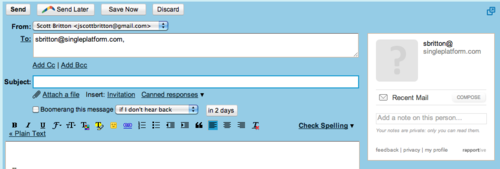
If Rapportive populates a profile, I know I have guessed correctly. Note the difference:
Incorrect Email
Correct Email
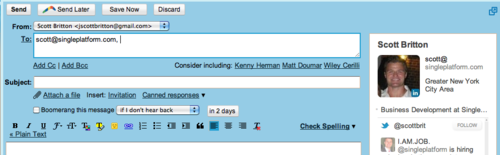
There are frequent instances where you may have guessed correctly, yet Rapportive does not populate a profile. This occurs because their data sources (Rapleaf amongst others) does not possess additional information for that email.
I start this process with Rapportive because in addition to determining the target’s email address, it also gives me additional context such as tweets and links to their various digital presences. These all provide potential touchpoints for a connection which makes cold outreach more effective. “Hey noticed on twitter your an Eagles fan. I was super bummed about the loss too. Anyways…”
MailTester
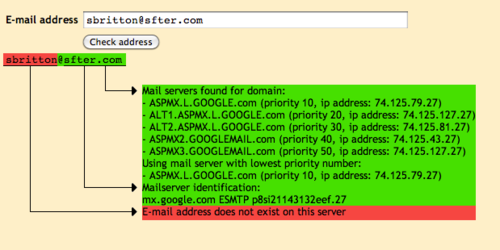
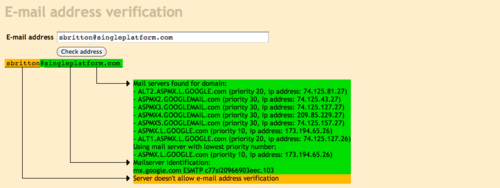
If rapportive fails, I move to MailTester.com. This service checks whether email addresses are attached to a specific domain then determines whether the name combination you’re trying is correct. This is valuable because it first determines whether you’re guessing the right domain. Often large companies have separate domains for email than the one that their native website resides on. MailTester enables me to determine whether this is the case. Once I have the domain correct, I begin to plug in the popular syntaxes highlighted above. If the server allows email address verification, MailTester will let me know if I’ve guessed correctly.
Incorrect
Correct
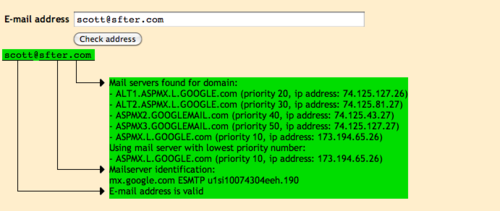
Again, sometimes don’t work with mail tester because they do not permit email address verification. That looks like this:
Snapbird
This is an excellent work-around for finding someone’s personal email address. Snapbird is a twitter search engine. People will sometimes share their email address on twitter when someone tweets at them that’d they like to send them something. You can use Snapbird to isolate these instances by entering their handle and the relevant domain – i.e. @Scottbrit // gmail

Above is an example of how you can use Snapbird to isolate these instances an ultimately find someone’s email address.
If you use these methodologies there is about a 95% chance you can find anyone’s email address. Otherwise there is always the contact form.
Jigsaw/Data.com
When Rapportive and MailTester don’t work, I hit up Jigsaw/Data.com. It’s a contributory contact database that is free to join. After you’ve exhausted you’re credit for free contacts, you can exchange your rolodex for access to target emails.
If they have the contact I’m looking for I double check the email address provided via Rapportive and MailTester. Because all the content is user-generated there is some poor information here so it gives me piece of mind to double check.
If they don’t have the specific contact I’m looking for, I’ll obtain the contact information for two different people at that company to try in order to determine the syntax. When I do this, I try to get the most recently added contacts and make sure they were added on different dates. Why? Because I want fresh data and people often batch phony information.
[ois skin=”Cold Email Skin”]
Google Your Best Guess
If you have still not been able to find the person’s email address your looking for there is still hope. Often people put their email on pdf’s such as press releases which appear in search results. So go ahead and google the popular syntax combinations.
Call and Ask
Find the main phone number on the website and call the organization you’re trying to reach. Tell the receptionist you were trying to send something important to x and politely ask if you could have this person’s email address.
I know talking to an actual person might be scary, but relax. You’re not asking the receptionist out on a date. You’re asking her for information. It’s her job to provide this to you. She won’t tell you to bow your head in shame after this request. I promise. Pick up the phone.
Go Rogue. Hit their Personal Email
When all hope seems lost, I do something I don’t like doing. I try the rapportive trick with my best guess of their personal gmail. When a profile populates I cross check with whatever social profile appears to verify that this is the person I’m trying to reach. Although it can feel like you’re crossing over sacred ground, if you’re offering is truly a value add and you’re able to convey this effectively, people will appreciate you reaching out.
I always preface these emails with:
“Hey x,
Apologies for pinging you on your personal email here, but I couldn’t find any other way of contacting you”
If you’re hesitant to do this, think about what you have to gain vs. lose. I never hit a shot a I didn’t take.
Register.com
If you’re dealing with a small site (1-2 person operation), you may be still stranded on the unlisted island even after doing all of these things. At this point, I’ll go to register.com and do a reverse who is lookup for whatever domain owner I’m trying to reach. If the domain is not private which is often the case, I’ll be provided with the owner’s contact email. Believe it or not, I’ve gotten a deal through this.
Emails for Corporations
Emails for corporations is a free resource that provides the business email address patterns for over 1000 companies. It also provides other valuable information such as the corporate phone number.

One feature that I really like is that I’m able to search by industry and geographical location. These facets are valuable for prospecting.
Toofr
Toofr is another email database that I’ve called upon to find email addresses. It claims to have email addresses for over 400k companies. I’ve used it a few times and I’d say 80% of the time its correct. They start you out with 10 free attempts, but after that you need to pay. Considering, there’s a bunch of free alternatives I only go here as a last resort.
CEO Email AddressesCEO Email addresses is exactly what it sounds like. Not surprisingly sometimes the CEO’S email address doesn’t match the syntax of the rest of the company. Other times it does. Either way this is a valuable resource to find email addresses for the folks hanging in the c-suite.
[ois skin=”Cold Email Skin”]
